mLite - GPS Location Tracker
- 3.9
- Rating
- 10.00M
- Installs
- Free
- Price
 Analysis by App-foxy
I approached mLite - GPS Location Tracker as a practical family-safety tool rather than a general lifestyle app. Its purpose is straightforward: help parents keep track of children through location sharing and parental-control features. That narrow focus is its biggest strength. You are not opening it for entertainment, planning, or social networking; you are using it when knowing where a child is can make an ordinary day feel more manageable.
The app is developed by IPL GROUP PTY LTD and sits in the Lifestyle category. It is free to install, has an Everyone age rating, and has been available since June 23, 2016. The current release is version 3.14.0, and it requires Android 8.0 or later. On Google Play, it has passed the ten-million-install mark, with an average rating of 3.3 from roughly twelve thousand ratings and more than seven hundred reviews. Those figures suggest a widely used service with a mixed experience, so I would not treat the download count as proof that it will suit every family.
How the free access and paid value fit together
The most important cost detail is that the app itself is free to download. That makes it easy to test without committing money at the beginning, which is useful for parents who want to see whether the location-sharing experience works well with their family’s phones and routines. The app also includes in-app purchases ranging from $0.99 to $199.99 per item, so “free” should be understood as free entry rather than a promise that every available option costs nothing.
You May Also Like

 Blood Strike: 2.5 Anniversary
Blood Strike’s Loadouts Turn Every Drop Into a Tactical Gamble
A close look at Blood Strike’s custom loadouts: how fast access to signature weapons reshapes its battle royale rhythm, rewards preparation, and narrows the gap between fights.

 Pandora - Music & Podcasts
Pandora’s Music Is Easy to Start, but Harder to Recover
Pandora’s strength is its low-effort path from a seed to a station. Its weak spot is how much confidence it asks you to place in connection, setup, and quiet recovery.

 8 Ball Pool
 Is Built on Rivalries, Rematches, and Routine
A close look at the rivalries, rematches, shared routines, and unanswered safety questions that turn a quick pool match into a persistent mobile community.

 Samsung Music
’s Quiet Strength Is Playing What You Already Own
Its reach comes less from spectacle than from dependable access to a personal library. That simplicity is both the app’s strongest retention engine and its ceiling.

 AccuWeather: Weather Radar
AccuWeather Review: A Quick, Clear Forecast for Everyday Decisions
For everyday plans, the best forecast is the one you can understand quickly. AccuWeather makes rain timing, radar, and local conditions easy to act on, with a few trade-offs.

 Hill Climb Racing
Why Hill Climb Racing Still Turns Crashes Into One More Run
A tiny car, a bumpy hill and one more upgrade: Hill Climb Racing keeps resurfacing because its simple chaos makes every near-miss feel personal.
More From Our News Desk
View All News


I would be careful before assuming that a purchase is necessary. The sensible approach is to install the app, connect the relevant family accounts, and identify which functions are available without payment before deciding whether an upgrade has enough value for you. A low-cost purchase can be reasonable if it solves a specific problem you face every week. A high-priced option deserves much more scrutiny, especially when your only requirement is occasional location sharing.
There is an important difference between paying for convenience and paying for peace of mind. If your child regularly travels independently, a paid feature may feel worthwhile when it reduces repeated calls and messages. If you only need to check a location once in a while, the free experience may be enough, and spending more could add little practical benefit. I would not buy anything simply because the app presents it during setup; I would first decide what information your family actually needs.
The purchase range also means families should discuss expectations before using the app. One parent may want a simple way to see a child’s current location, while another may expect a complete monitoring system. Those are not necessarily the same thing. mLite is most appealing when you define a small, clear safety routine rather than treating it as a replacement for communication, judgment, or supervision.
What the app is useful for in everyday family life
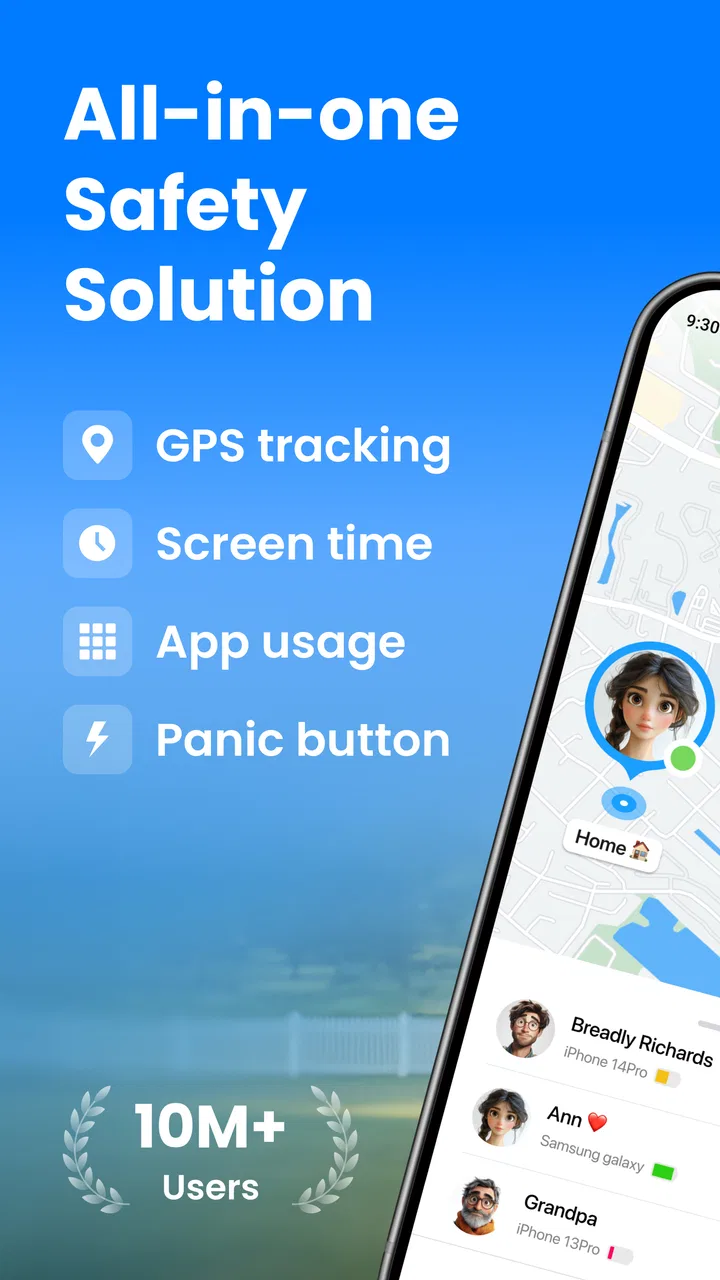
The central benefit is live GPS location sharing. In practice, that can make a difference during routine transitions: a child leaving school, visiting a friend, walking home, or taking public transport. Instead of sending several “Where are you?” messages, a parent can use the app as a location reference and then contact the child when a conversation is actually needed.
A realistic example is a weekday afternoon when a child is expected home after an activity. The activity ends, the child is delayed, and a parent is preparing dinner while also wondering whether the child has started the journey. A location tool can reduce that uncertainty. It does not explain why the child is late, and it does not remove the need to call when something seems wrong, but it can provide useful context before that call.
That distinction is one of the app’s most important practical lessons. Location is not the same as safety. A phone may be left in a bag, have a weak connection, run out of battery, or remain in one place while the child moves elsewhere. I would use mLite as one part of a family plan, alongside agreed check-in times and a clear understanding of what to do if contact is lost.
For younger children, the app may be most helpful when a parent controls the setup and explains its purpose in simple language. For older children, transparency matters even more. Presenting tracking as a shared safety arrangement is likely to work better than quietly turning it into a surveillance contest. The technology can support trust when everyone understands when it is used and why.
Small workflow choices that make it more useful
My first practical tip is to test the whole routine before relying on it during a stressful situation. Install the app on the parent’s phone and the child’s phone, complete the connection process, and check whether the expected location appears under normal conditions. Do this at home, then repeat it outdoors. A setup that looks fine on a desk may feel different when the child is moving between buildings or travelling through areas with inconsistent connectivity.
My second tip is to create a simple rule for when location checking is appropriate. For example, a parent might check during a planned journey rather than refreshing constantly. This avoids turning the service into a source of anxiety for both sides. It also makes unusual behavior easier to notice because there is a normal routine to compare with.
A third useful habit is to treat the child’s phone as part of the system, not as an afterthought. The tracker is only helpful when the phone is with the child, usable, and able to share its position. Before school trips or long journeys, I would make sure the child knows where the phone is and understands that the app is intended to support a check-in plan. That sounds obvious, but it is the sort of detail that determines whether a location app helps in real life.
Another worthwhile workflow is to agree on a backup method. If the app does not show a useful update, the family should already know whether to call, send a message, contact another adult, or wait for a planned check-in. This prevents parents from treating a blank or stale map as a definitive answer. The app can shorten uncertainty, but it cannot replace a response plan.
Where the experience may feel limited
The average rating of 3.3 indicates that the experience is not universally smooth. I would interpret that as a reason to test the app carefully rather than as an automatic rejection. Location services are affected by the phone, network conditions, battery state, and the way a family uses the app. A problem that is minor for one household can be unacceptable for another, particularly when parents expect immediate and dependable updates.
There is also a psychological trade-off. A location tracker can reassure a parent, but frequent checking can encourage worry instead of reducing it. If you find yourself watching the map continuously, the app may be changing the family routine in an unhealthy direction. In that situation, a basic check-in agreement or a less intensive location-sharing option might be better.
Privacy and independence deserve equal attention. A young child may need close supervision, while an older teenager may reasonably expect more personal space. The same setting should not automatically apply to every age group. I would review the arrangement as the child becomes more independent, explaining what is shared and when the information is used. That conversation is not an optional extra; it affects whether the tool supports cooperation or creates conflict.
The app is also not the right choice for someone looking for a broad digital-parenting suite unless the available controls match that expectation. Its identity is centered on parental control and GPS location sharing. If your priority is screen-time scheduling, content filtering, schoolwork management, or a wider device-administration system, you may prefer a specialized alternative that concentrates on those areas.
Likewise, families who already use a dependable location-sharing service built into their phones should compare the actual benefit before adding another app. A second tracker can create duplicated alerts, extra account management, and confusion about which map is current. mLite makes more sense when its particular family workflow is clearer or more convenient than the tools you already have.
How it compares with familiar alternatives
The usual alternative is a phone’s built-in location-sharing feature. That option can be attractive because it may already be familiar to the family and may avoid installing another service. mLite is more appealing when you specifically want an app presented around parental control and child-focused tracking rather than general location sharing between friends or relatives.
Another alternative is simply calling or messaging. For families with older children who reliably respond, that may be enough. It is cheaper in effort and can encourage direct communication, but it depends on the child seeing the message and replying. mLite adds a location reference for situations where a parent wants context before deciding whether a call is necessary.
Dedicated family-safety products can offer a broader package, but they may also be more complicated or more expensive. I would choose one of those when the household needs several types of supervision in one place. I would choose mLite when the central question is narrower: can the family share a child’s location in a way that fits its daily routine?
There is no universal winner here. The best option depends on whether you value a focused parental-control experience, an existing phone ecosystem, or a larger set of family-management tools. mLite’s free entry makes comparison easier, because you can evaluate its basic workflow before deciding whether it deserves a permanent place on your devices.
Who is most likely to get real value
I think mLite is best suited to parents of children who are beginning to travel short distances without an adult. It can be useful during the transition from constant supervision to planned independence, when parents want reassurance but do not want to call every few minutes. It may also suit families whose schedules involve several pickups, activities, and changes of plan.
It can be especially practical when one parent handles most of the daily coordination and needs a quick way to understand where a child is before arranging transport or making a call. In that situation, the app’s value comes less from dramatic emergencies and more from reducing small uncertainties throughout the week.
Families should skip it if everyone already has a location-sharing method they trust and nobody needs parental-control features. I would also avoid making it the main solution if the child does not carry a compatible phone consistently, if the family cannot agree on reasonable boundaries, or if a parent expects the map to guarantee safety. Those expectations are too demanding for any location app.
People who dislike recurring in-app decisions should also examine the purchase flow carefully. The download is free, but the presence of paid items means you should decide in advance what you are willing to spend. The largest listed purchase is a substantial commitment compared with simply trying the app, so I would not move from testing to buying without a clearly identified benefit.
My recommendation after weighing the value
My verdict is to try mLite when you need a focused child-location tool and want to begin without paying for the download. The core idea is easy to understand, and live GPS sharing can be genuinely useful during school journeys, activities, and the early stages of independent travel. The app’s long availability and large install base also show that it has reached many families, although the mixed average rating is a reminder to judge it by your own setup.
I would keep the free experience until it proves useful in your household. Test it during ordinary trips, establish a communication backup, and decide whether the information it provides is timely and clear enough for your needs. Only then should you consider an in-app purchase, and only when the specific paid value is obvious rather than assumed.
My honest recommendation is simple: use mLite as a practical aid, not as a substitute for trust, conversation, or responsible supervision. If that balance matches what you want, it is worth trying. If you need advanced device management, guaranteed tracking, or a complete digital-parenting platform, another category of tool may serve you better. For families seeking free-to-start GPS location sharing with a parental-control focus, however, mLite is a reasonable option to test before making a paid commitment.
FAQs for mLite - GPS Location Tracker
01What is mLite - GPS Location Tracker and how does it work?
mLite - GPS Location Tracker is a mobile application designed to help users monitor the real-time location of friends or family members. By installing the app on both devices, users can track movements on a map, receive location updates, and set up geofences. It uses GPS technology to provide accurate location details, ensuring peace of mind for loved ones.
02Is mLite - GPS Location Tracker safe to use in terms of privacy?
Yes, mLite prioritizes user privacy by implementing strict data protection policies. Location sharing is only possible with mutual consent, ensuring that users are aware of and agree to being tracked. The app does not share data with third parties without explicit permission, and all data is securely encrypted to prevent unauthorized access.
03What are the primary features of mLite - GPS Location Tracker?
mLite offers a variety of features including real-time location tracking, geofencing alerts, and location history. Users can receive notifications when a tracked device enters or leaves designated areas. Additionally, the app provides an emergency SOS feature for immediate assistance, and it offers a user-friendly interface for easy navigation and use.
04Are there any subscription fees or in-app purchases in mLite?
mLite offers both free and premium subscription plans. The free version includes basic tracking features, while the premium plan provides access to advanced functionalities such as unlimited location history and additional geofencing options. Users can choose between monthly or yearly subscriptions, and all transactions are securely processed through the app stores.
05Which devices and operating systems are compatible with mLite?
mLite is compatible with both Android and iOS devices, ensuring a wide range of usability across smartphones and tablets. It requires Android version 4.4 or higher and iOS version 10.0 or later. Users should ensure their devices meet these requirements for optimal performance and functionality of the app.
Pros
- Easy to set up and start tracking.
- Real-time location updates available.
- User-friendly interface design.
- Battery-saving mode included.
- Supports multiple devices simultaneously.
Cons
- Limited features in the free version.
- Location accuracy can vary.
- Requires constant internet connection.
- Some features need manual updates.
- Privacy concerns over data sharing.

mLite - GPS Location Tracker
Gallery